
In February 2026, a team from ETH Zurich’s Applied Cryptography Group and the Università della Svizzera italiana published a paper that should have rewritten the way people evaluate password managers. The researchers, led by Professor Kenneth Paterson, built fake servers that behaved like hacked versions of real password manager infrastructure. Then they used those servers to attack Bitwarden, LastPass, and Dashlane, three services that collectively hold the passwords of around 60 million people.
They developed 25 successful attacks. Twelve against Bitwarden. Seven against LastPass. Six against Dashlane. The attacks ranged from reading individual passwords to compromising every vault in an entire organization. In most cases, the researchers could not only view the stored passwords but change them. All they needed were the routine interactions that happen every time someone uses a cloud password manager: logging in, opening the vault, syncing data between devices.
All three services advertise “zero-knowledge encryption.” The promise is that your vault is encrypted with a key derived from your master password, which the company never has, so even if someone breaches their server, your data is unreadable. That promise held up exactly as long as the server behaved honestly. The moment it did not, the encryption became irrelevant.
The Promise vs. the Architecture
Zero-knowledge encryption is a real cryptographic property. In theory, it means the server stores your vault in a form it cannot decrypt. Your master password never leaves your device. The encryption key is derived locally. The server is just a dumb storage locker that holds an opaque blob of ciphertext it cannot read. That is how it is marketed. That is what people believe they are getting.
The problem, as the ETH Zurich team demonstrated, is that zero-knowledge is a property of the protocol in isolation, not the system as a whole. And the system includes the server, the client, the update mechanism, the sync protocol, the sharing features, and every design decision connecting them. When the server mediates every interaction between the client and the vault, it does not need to break the encryption. It just needs to change the rules around it.
Professor Paterson put it bluntly: “The promise is that even if someone is able to access the server, this does not pose a security risk to customers because the data is encrypted and therefore unreadable. We have now shown that this is not the case.”
How the Attacks Work
The researchers used what cryptographers call a “malicious server threat model.” They did not try to crack the encryption. They did not brute-force master passwords. They did not exploit bugs in the client software. They simply made the server lie. Because the client trusts the server to set the parameters for how encryption works, a compromised server can manipulate those parameters to weaken the protection without the user ever knowing.
The server tells the client to use weaker encryption settings. In one Dashlane attack, the server exploited backward compatibility with legacy cryptography from the 1990s. The client accepted the downgrade because it was designed to trust whatever the server specified. The vault was still “encrypted.” Just not well enough to matter.
The server modifies the contents of a user’s vault during sync. Because the client does not independently verify the integrity of every field in the vault against a source of truth it controls, the server can swap, inject, or alter entries. The user opens their vault and sees passwords the attacker placed there, or does not see passwords the attacker removed.
Even when the payload is encrypted, the structure around it is not. URLs, folder names, sharing permissions, timestamps. The server can see which sites you have accounts with, how your vault is organized, and who you share credentials with. In some cases, this metadata was enough to draw conclusions about the encrypted contents without ever decrypting them.
When users share passwords with family members or coworkers, the server mediates the exchange. In Bitwarden, the researchers found that public keys used in the sharing protocol were not properly authenticated. A malicious server could substitute its own keys, intercept the shared credentials in transit, and re-encrypt them for the intended recipient. The sharing worked. The server had a copy of everything shared.
PhD student Matteo Scarlata, who carried out several of the attacks, found that the root cause was complexity driven by convenience features. As companies added password recovery, family sharing, cross-device sync, and browser extensions, the codebase grew more tangled and the attack surface expanded. “The code becomes more complex and confusing, and it expands the potential attack surface for hackers,” Scarlata explained. The attacks did not require powerful hardware. Just small programs capable of impersonating the server.
Why the Vendors Cannot Easily Fix This
The ETH Zurich team gave all three vendors 90 days to patch the vulnerabilities before publication, which is standard responsible disclosure. The response was instructive. The vendors were cooperative, Paterson said, but slow. Not because they did not care, but because they were afraid. Millions of users depend on these systems. Thousands of businesses have entrusted their entire credential infrastructure to these platforms. A botched update could lock people out of their own passwords permanently.
Many of the vulnerabilities are rooted in backward compatibility. These services have been running for years, some for over a decade, and they still support cryptographic methods from the 1990s so that existing users do not have to re-encrypt their vaults. Scarlata noted that the providers are hesitant to update their systems because of the migration risk. But that backward compatibility is exactly what the researchers exploited. The old crypto is still there, and the server can force the client to use it.
This is a structural problem, not a patching problem. You cannot fix it by updating a library or rotating a key. The architecture assumes a trusted server. When the server is not trusted, the architecture fails. And the entire field of security research exists because servers get compromised. That is not a hypothetical. LastPass proved it in 2022. The ETH Zurich team proved the consequences in 2026.
The Local-First Alternative: Remove the Server
Every attack in the ETH Zurich study requires a server that mediates communication with the client. Every one. The encryption downgrades require a server that sets encryption parameters. The vault integrity attacks require a server that handles sync. The metadata leakage requires a server that processes structured data. The sharing exploits require a server that brokers key exchanges. Remove the server, and the entire attack model collapses. Not because you have better encryption or a smarter protocol, but because the attack surface does not exist.
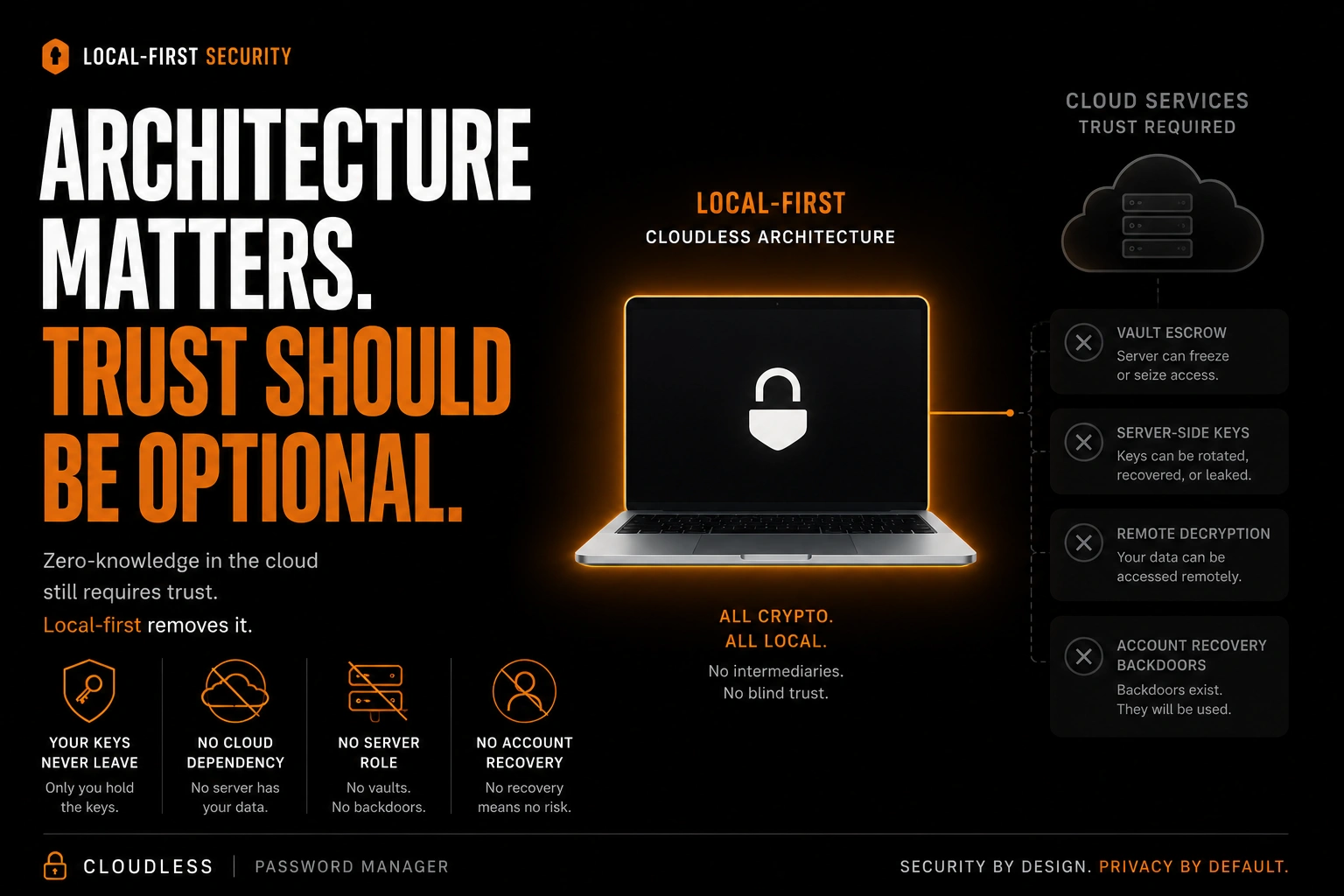
That is what local-first architecture does. Your vault lives on your device. It is encrypted locally with your master password. There is no server that stores it, syncs it, or mediates access to it. There is no infrastructure on the vendor’s end that can be compromised to reach your data. The encryption is not zero-knowledge because there is no second party that needs to be kept ignorant. There is only you and your device.
There is no server to send downgraded parameters. The encryption settings are compiled into the app on your device. A local-first password manager built from scratch has no legacy cryptography to fall back to because there is no legacy. There is no decade-old user base running 1990s-era encryption that needs to be supported. There is one encryption path, the current one, and no server to tell the client otherwise.
There is no server-side copy of your vault that can be tampered with during sync. Your device is the primary copy. If you back up to cloud storage, the backup is an encrypted file your storage provider cannot read. There is no sync protocol where a server pushes modified vault contents to your client, because there is no server in the loop.
The server in a cloud password manager sees metadata because it has to process structured data to provide features like search, sharing, and organization. A local-first password manager processes all of that on your device. No server ever sees your folder structure, your URLs, your sharing relationships, or your timestamps. The metadata never leaves your device because there is nowhere for it to go.
Most local-first password managers do not yet support credential sharing, and that is worth being honest about. But when sharing is implemented in a local-first architecture, it does not have to route through a central server that can swap keys. Devices can exchange encrypted data directly, or through a file-based transport where the encryption is handled entirely on device. The server-as-broker model that the ETH Zurich team exploited is not the only way to build sharing. It is just the easiest way, and the study showed why easy is not the same as safe.
The Backward Compatibility Trap
One of the most revealing details in the ETH Zurich study is how much damage backward compatibility caused. Dashlane still supported cryptographic methods from the 1990s so that users who created their vaults years ago would not have to re-encrypt. That legacy support is what the researchers exploited to force an encryption downgrade. The old code was still there, still accepted by the client, still reachable by the server.
This is a trap that every long-running cloud service eventually falls into. You cannot remove support for old encryption without migrating every user who still relies on it. But you cannot migrate them without risking data loss. And the longer you wait, the larger the user base on the old system and the higher the stakes of any migration attempt. The vendors told the researchers they were terrified of breaking something. So the 1990s crypto stayed, and the attack surface stayed with it.
A password manager built recently does not have this problem. There is no legacy user base on old encryption. There are no 1990s-era key derivation functions hiding in the codebase. Every vault uses the same modern cryptography because there was never an older version to support. But that advantage only holds if the architecture actively prevents old backups from becoming a vulnerability. When a user changes their master password, every backup file needs to be re-encrypted with the new credentials, and the cryptographic parameters inside those backups need to be updated to match. If an old backup sitting on a cloud drive still uses the original password and original key derivation, it is a frozen copy of the vulnerability the password change was supposed to eliminate. A well-designed backup system treats credential changes as events that propagate to every copy, not just the live vault.
The Sync Question
Multi-device access is the reason most people choose cloud password managers. It is the killer feature. And it is the feature that creates the server dependency the ETH Zurich team exploited. If your vault has to sync through a vendor’s server, that server becomes the chokepoint where every attack in the study was executed.
But sync does not require a server that understands the data it is moving. Local-first alternatives exist that can bridge sync between devices without a centralized server acting as an intermediary. Some involve trade-offs that have to be weighed carefully, but the fundamental difference is this: the sync layer becomes a transport mechanism, not an attack surface. The encryption is handled entirely on your device. Whatever carries the file between devices sees an encrypted blob. That is all it will ever see. There is no server dictating which encryption algorithm the client should use, no server-side component deciding how key derivation should be configured, no centralized authority managing vault structure or resolving sync conflicts in ways that can be quietly manipulated. Every parameter that the ETH Zurich researchers exploited, the encryption settings, the key exchange in sharing, the integrity checks during sync, those are all decisions that a centralized server made on behalf of the client. When the sync layer is reduced to transport, there is no place for those decisions to be intercepted or altered. The attack surface the researchers mapped out does not exist because the infrastructure it depends on does not exist.
This is a fundamentally different security model from what Bitwarden, LastPass, and Dashlane use. Their servers are active participants in the sync process, parsing vault structures, resolving conflicts, managing sharing permissions, and setting encryption parameters. That active participation is exactly what the researchers exploited. A transport layer that simply moves an encrypted file from one place to another cannot send your client downgraded encryption settings. It cannot swap entries in your vault during sync. It cannot substitute public keys in a sharing exchange. It just moves bytes.
What You Should Ask Your Password Manager
The ETH Zurich study is not an argument against using a password manager. Using any password manager is still better than reusing passwords or keeping them in a note on your phone. But it is an argument for asking a better question than “is it encrypted?” Everything is encrypted now. That is table stakes. The better question is: who has access to the system that controls how the encryption works?
If the answer is a server operated by a company, then zero-knowledge encryption is a promise that depends on that server behaving honestly, the company never being breached, the code never having a backward compatibility flaw, the sync protocol never being manipulated, and the sharing mechanism never being exploited. The ETH Zurich team showed that all five of those assumptions can fail, and did, across three of the most popular password managers in the world.
If the answer is your device and nothing else, then the question changes. You still need strong encryption. You still need a strong master password. You still need to protect your device from malware and physical theft. But you do not need to trust a server you have never seen, operated by a company you have never met, in a jurisdiction you did not choose, running code you cannot audit, with backward compatibility decisions you were never told about. You just need to trust the device in your hand. For most people, that is a much shorter list of things to worry about.
Stellar Password Manager is available on Android. It was built from the ground up as a local-first password manager. There is no Stellar server. There is no Stellar cloud. Your vault lives on your device, encrypted with AES-256 and a master key derived through Argon2id. Backups are encrypted files you place wherever you choose. When you change your master password, the backup system re-encrypts every backup and archive with the new credentials automatically, because a password change that does not reach your backups is not really a password change. The architecture was designed so that every attack in the ETH Zurich study has no surface to land on. Not because we wrote better code than Bitwarden or Dashlane. Because we did not build a server. Get Stellar on Google Play →
The ETH Zurich paper, “Zero Knowledge (About) Encryption: A Comparative Security Analysis of Three Cloud-based Password Managers,” by Matteo Scarlata, Giovanni Torrisi, Matilda Backendal, and Kenneth G. Paterson, will be presented at USENIX Security 2026 in August. The preprint is available at eprint.iacr.org/2026/058. The project website is at zkae.io.
Additional sources: SpyCloud 2026 Identity Exposure Report; LastPass breach disclosures (2022–2026); ETH Zurich news release, “Password managers less secure than promised” (Feb. 16, 2026).
Related: Just weeks after this article was published, Dashlane's TOTP-based 2FA was brute-forced by an attacker who already had user passwords. The 2022 LastPass breach exposed 30 million vaults and the fallout is still ongoing. See Is LastPass Safe? The Breach That Keeps On Taking. For a comparison of offline password managers, see Best Offline Password Managers Compared.