Every password manager claims to work offline now. After the LastPass breach exposed 30 million cloud-hosted vaults and researchers at ETH Zurich proved that “zero-knowledge encryption” can be bypassed when the central server is compromised, the marketing departments noticed. Suddenly every product page features the word “offline” somewhere in the feature list. But there is a massive difference between a password manager that was designed around offline from the beginning and one that bolted on a read-only offline mode after the fact to check a box. That difference matters when the Wi-Fi goes out, when you switch devices, and especially when you think about what happens to your data over the next ten years.
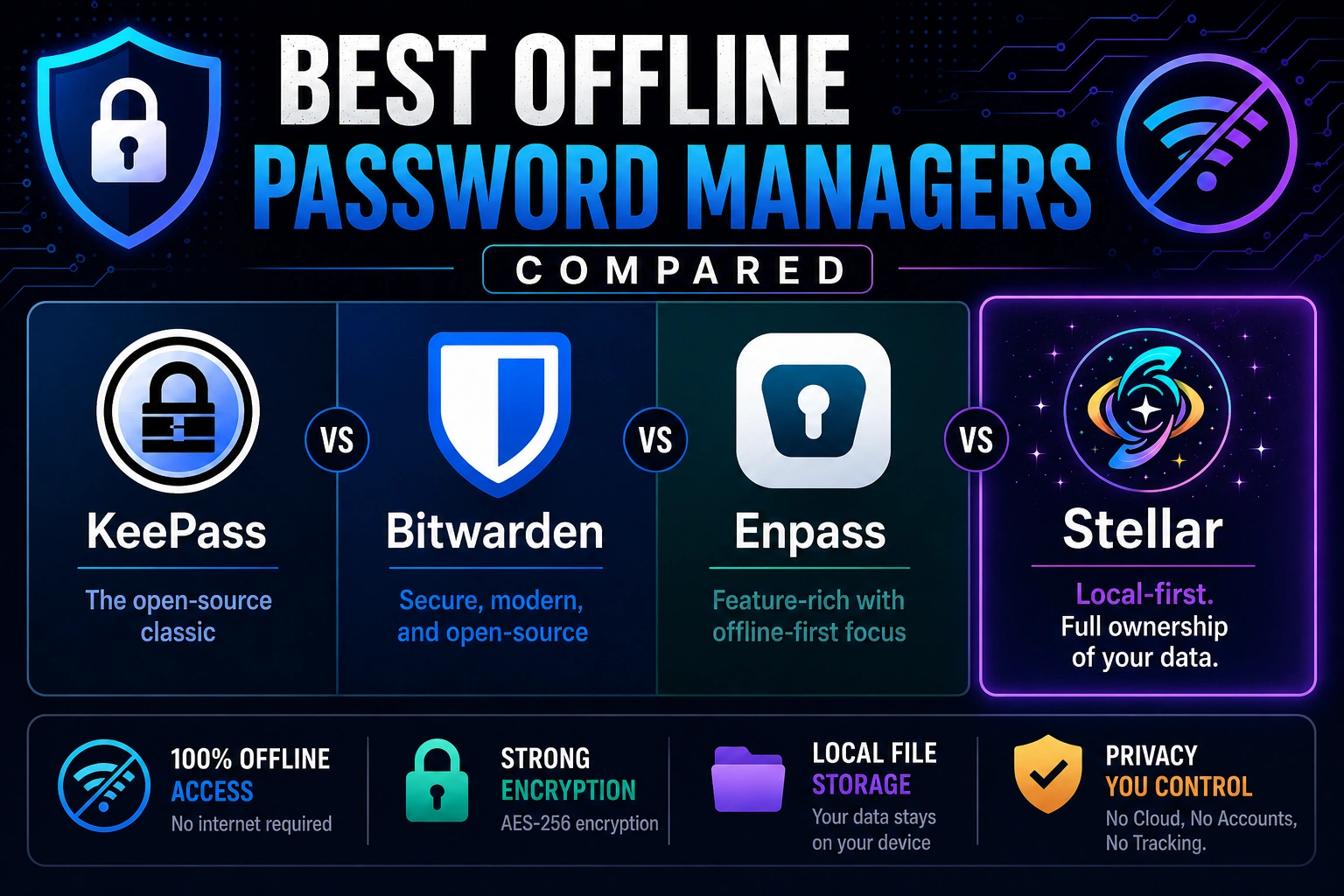
This is a comparison of four password managers that take local storage seriously, or at least claim to: KeePass, Bitwarden, Enpass, and Stellar. We built Stellar, so we are obviously biased. We are going to be upfront about that and try to be fair about where the others do things well, because some of them genuinely do. But we are also going to be honest about where we think the architecture matters, because that is the whole point.
In 2019, researchers at Ink & Switch, an independent research lab, published a paper called “Local-First Software: You Own Your Data, in Spite of the Cloud.” The paper laid out seven ideals for what software should look like if it actually respects the person using it: it should be fast with no network round-trips for basic operations, it should work across multiple devices, it should be fully functional offline, it should still allow collaboration, it should keep working in ten years even if the company behind it disappears, it should protect your privacy, and you should have real control over your data. That paper became a kind of manifesto for a growing community of developers building software that treats your device as the primary copy of your data, not the cloud. We think it is one of the most important things written about software in the last decade, and it is the lens through which we are going to look at these four password managers.
 Bitwarden: Cloud-First with an Offline Asterisk
Bitwarden is the darling of the password manager world right now, and for good reason. It is open source, well-audited, reasonably priced, and the free tier is genuinely generous with unlimited passwords across unlimited devices. The mobile apps work. The interface is clean. If you are coming from LastPass or 1Password and want something that feels familiar but has better open-source credentials, Bitwarden is the obvious move.
But here is the thing about Bitwarden and offline. Bitwarden does work offline in the sense that if you have already unlocked your vault and your internet dies, you can still read your passwords. That is real and useful. What you cannot do is edit anything, add new entries, or import data while offline. It is read-only. If you are on a plane and need to add a password for the airport Wi-Fi portal you just connected to, you are out of luck. The vault is cached locally, but the source of truth is still the Bitwarden cloud server. Your device has a copy. The server has the original.
Bitwarden does offer a self-hosted option, which is genuinely cool. You can run the entire Bitwarden stack on your own server using Docker or Kubernetes. This gets you out of Bitwarden’s cloud entirely and supports air-gapped networks. But self-hosting Bitwarden is not the same thing as a local-first architecture. You have replaced their server with your server. The vault still lives on a server. You are still running infrastructure, maintaining containers, handling updates, and dealing with the operational overhead that comes with it. For organizations with IT staff, that is a viable path. For an individual who just wants their passwords on their phone without depending on someone else’s uptime, it is a nonstarter.
 KeePass: The Original, for Better and Worse
KeePass has been around since 2003. It is free, open source, and entirely offline. Your vault is a single encrypted file on your device, secured with AES-256 and optionally ChaCha20, and it never touches anyone’s server unless you put it there yourself. There is no account to create, no subscription to pay, and no company holding a copy of your data. If you want a USB drive with your passwords on it and nothing else, KeePass is the tool that has been doing that since before most cloud password managers existed.
KeePass has no built-in sync. If you want your passwords on your phone and your laptop, you are manually copying a database file or rigging up your own sync through Dropbox or Google Drive or a WebDAV server. There are third-party KeePass-compatible apps for Android and iOS, but they are made by different developers with different interfaces and different update schedules. The desktop app itself looks like it was designed in 2003, because it was. The auto-type feature is powerful if you are willing to configure keystroke sequences, but for most people it is baffling.
KeePass is the tool for people who already know exactly what they want and are willing to do the work to get it. If you are a sysadmin who has been keeping a KeePass file on an encrypted thumb drive for years, you already understand why offline matters. The question is whether you should have to keep accepting the trade-off between that security and an interface that nobody is paid to improve. For everyone else, the gap between KeePass’s power and its usability is the size of a canyon. The security is real. The experience is not.
 Enpass: Closest to the Right Idea
Enpass is the most interesting competitor in this space because it genuinely rejects the idea of hosting your data on its own servers. Enpass stores your vault locally on your device, encrypted with AES-256 coupled with 320,000 rounds of PBKDF2-HMAC-SHA512 via SQLCipher. The company never has a copy of your data. There is no Enpass cloud. If you want to sync across devices, you connect your own cloud storage: iCloud, Google Drive, Dropbox, OneDrive, or a WebDAV server. Enpass also supports Wi-Fi sync for people who want to skip the cloud entirely.
This is meaningfully different from the Bitwarden model. Enpass is not hosting your vault and giving you offline access to a cached copy. Your device is the primary storage location. The cloud drive, if you use one, is just a transport layer you control. That is a real architectural distinction and it matters. If Enpass the company disappeared tomorrow, your vault would still be on your device, still encrypted, still yours. You would need another app that can read the format, but the data itself is not locked behind a server that stopped running.
Where Enpass falls short is in the details. The free tier only supports one device and caps you at 25 items, which makes it basically a demo. The feature set has some gaps beyond that. Auto-fill works but has some rough edges. Password auditing and breach monitoring exist but lean on third-party data. And while the offline experience is strong, the sync setup still funnels you toward connecting a cloud service during onboarding. The default path is local-plus-cloud, not local-first.
Enpass is the closest commercial competitor to what we are trying to do with Stellar, and we respect the approach. The philosophical alignment is real. The execution differences are in where the architecture starts: Enpass added local as the better option within a conventional app. We started with local as the only assumption and built everything else around that.
 Stellar: Designed Around Offline
Stellar was built from the ground up as a local-first password manager. Your data lives on your device. It is encrypted locally with your master password using AES-256. There is no Stellar server. There is no Stellar cloud. There is no infrastructure on our end that stores, processes, or transmits your vault. Period.
Stellar launches on Android June 1st, with the Windows release coming in the next couple of months. What we can tell you is what is shipping with the Windows release: cross-device sync built on the same local-first foundation. Your vault stays on your device as the primary copy, and sync happens through your platform’s native file system, the same way you would move any other file on your device. No Stellar servers involved. No proprietary cloud connectors. Your operating system already knows how to reach iCloud, Google Drive, OneDrive, and the rest. We let it do that job because Apple, Google, and Microsoft have spent billions making their file systems handle cloud storage. We are not going to pretend we can do that better.
At launch, on Android, Stellar handles backup through that same native file browsing approach. You can back up your encrypted vault to any location your device can reach, including cloud drives. That is not the same as sync and we are not going to dress it up as something it is not yet. But the architecture is the important part. The foundation was designed for this from the start, not bolted on later. When cross-device sync ships, it will work the way local-first sync should work: your device is the primary copy, cloud storage is just a transport layer, and we never touch your data.
User control means something specific to us. It is not just that your data lives on your device. It means that if you ever want to leave Stellar, your data leaves with you and it stays secure on the way out. Every other password manager exports to a plaintext CSV. That is every password you own, unencrypted, in a file. Forget to delete it and your entire vault is sitting there naked on a USB drive or in a cloud folder for anyone to find. We think that is an insane way to handle the most sensitive data a person has.
Stellar does it differently. The backup is the export. It is encrypted with your master password, and we publish the format specification openly. Any other password manager can implement support for that format, prompt for the master password, and import your data. We believe that is the best form of export we could offer a user: portable, secure, and documented. Even an abandoned export file is worthless without the master password. We are so committed to the idea that you own your data that we publish exactly how to read it. That is what user control looks like when someone actually means it.
What Stellar does right now is work fully offline by default. You can create entries, edit entries, organize your vault, generate passwords, and do everything the app does without ever connecting to anything. The autofill uses an overlay service instead of a browser extension, which means it works across apps and browsers without injecting anything into your pages, without depending on your keyboard choice, and without the awkward icons that other managers shove into every input field on every site you visit.
Stellar launches on Android June 1st and the Windows release is following closely behind with a project roadmap date of August 1st to deliver multi-device sync. The near term roadmap also includes file encryption, passkey support, and group sharing. We are a small team and we are newer than everyone else on this list, but Stellar is the only password manager on this list designed to hit all seven local-first ideals. This is just the first release. The foundation is the part that cannot be retrofitted, and that is the part we got right first.
The Real Question
The password manager market is going through a reckoning. The LastPass breach, the ETH Zurich study, the Norton LifeLock credential stuffing attack, the $150 million in stolen crypto from cracked vaults, all of it points to the same structural problem: when you put millions of people’s secrets on a central server, the math favors the attacker. Not sometimes. Always. The incentive is too large, the target is too concentrated, and the damage, once done, is permanent.
The question is not whether your password manager works offline. It is whether offline was the starting point or the afterthought. Bitwarden proved that people want convenience with their security. KeePass proved that local-first password management works. Enpass proved that you do not need to run your own servers to have your own data. Stellar is trying to combine all three: local-first architecture, modern usability, and platform-native cloud access that puts you in control without making you run a Docker container to get there.
The Ink & Switch researchers put it well: the copy of data on your local device should be the primary copy, and the cloud should hold secondary copies to assist with access. That is not how most password managers work. But it is how we think they should work. The cloud is not the enemy. Depending on someone else’s cloud as the single source of truth for your most sensitive data, that is the problem. And the last three years of breach headlines have made it pretty hard to argue otherwise.
Sources: Ink & Switch, “Local-First Software: You Own Your Data, in Spite of the Cloud” (2019); ETH Zurich & USI password manager security study (Feb. 2026); KeePass official documentation; Bitwarden official documentation and offline mode help pages; Enpass official documentation; TRM Labs blockchain analysis (Dec. 2025); LastPass breach disclosures (2022–2026).
Learn more about Stellar Password Manager or get it on Google Play →
Related: For a deep dive into why zero-knowledge encryption alone does not protect cloud vaults, see what the ETH Zurich study means for your passwords. For a real-world example of cloud architecture failing, see the Dashlane 2FA breach. The 2022 LastPass breach is still taking a toll. See Is LastPass Safe? The Breach That Keeps On Taking.